Adding Multiple Administrator Accounts
The system provides a root Administrator (admin) account for system management. This primary account cannot be deleted and is used to create labeller and additional administrator accounts. All administrator accounts have full system access equivalent to the root admin.
Creating New Administrator Accounts
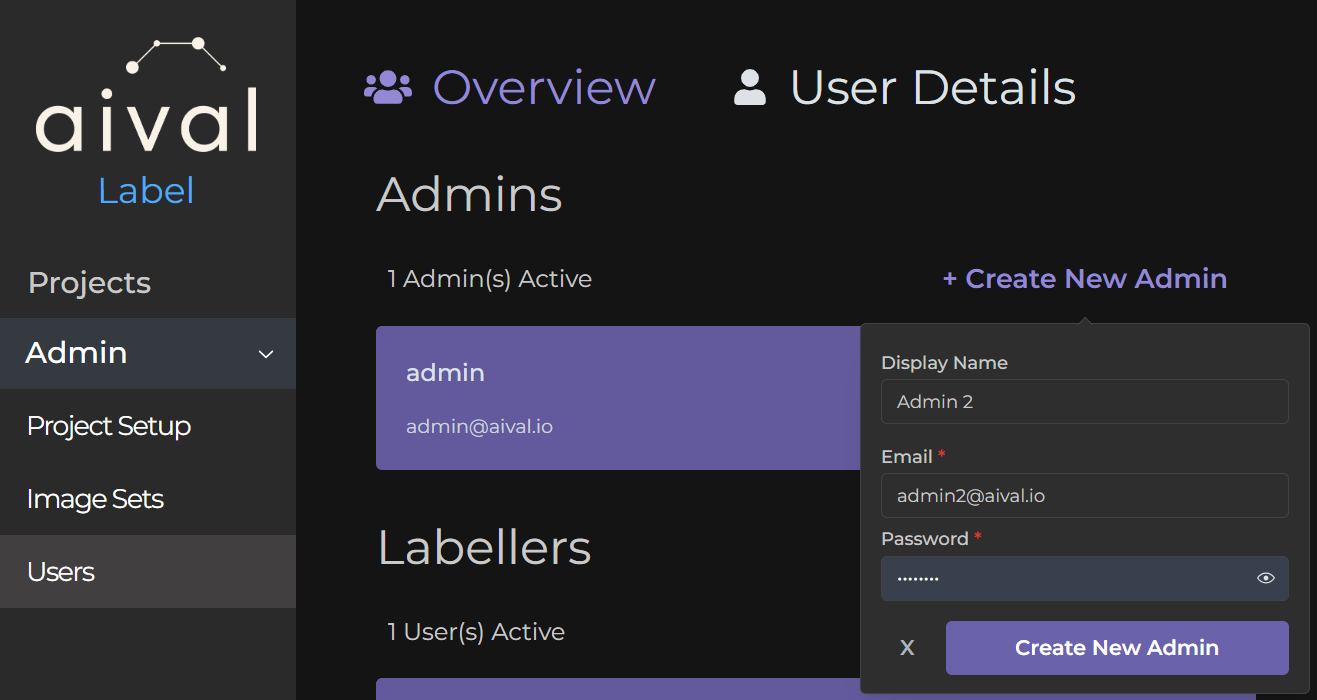
Here's how to add a new Administrator to your team:
Step 1 Sign in with your root admin account - this is required to create new admin accounts.
Step 2 Navigate to the Users section in the main menu.
Step 3 Locate the 'Create New Admin' button in the 'Admins' section of the Overview page.
Step 4 Fill in the new admin's profile information: display name, email address, and password.
Step 5 Click 'Create New Admin' to complete the process. You can then share the login credentials with the new administrator.
To remove an admin account, refer to our guide on managing administrator accounts.